SAP Business Accelerator Hub
SAP's developer hub had thousands of APIs, integration packages, and business content. But developers couldn't find what they needed. The homepage was a catalogue without a map. I was brought in to fix discovery, and ended up redesigning the entire structure of how the platform presents itself to the world.

01, THE CHALLENGE
A widely-used catalogue with room to go further.
At SAP TechED 2019 in Barcelona, I sat across from users at 16 different companies and watched the same thing happen, over and over: they knew exactly what they were looking for, and they still couldn't find it. The Hub had the content. What it lacked was any coherent path through it, a structure that matched how developers, architects, and consultants actually think when they need to solve a problem.
Poor Content Discovery
Thousands of APIs, events, and packages with no intuitive discovery path, users wasted time browsing irrelevant content.
No Persona Tailoring
Developers, integration architects, and business analysts had identical experiences despite having completely different needs.
Inefficient Search
Search returned noisy results with no filtering by content type, persona relevance, or use-case context.
Rigid Content Structure
Fixed layouts couldn't accommodate the variety of content types, API specs, events, integration packages, and documentation.
02, MY PROCESS
How a surface-level brief became a structural redesign.
The original brief was a visual refresh. Research changed everything. Here's how I moved from TechED observations to an IA redesign the PM hadn't asked for, and why that was the right call.
01
Discovery & User Research
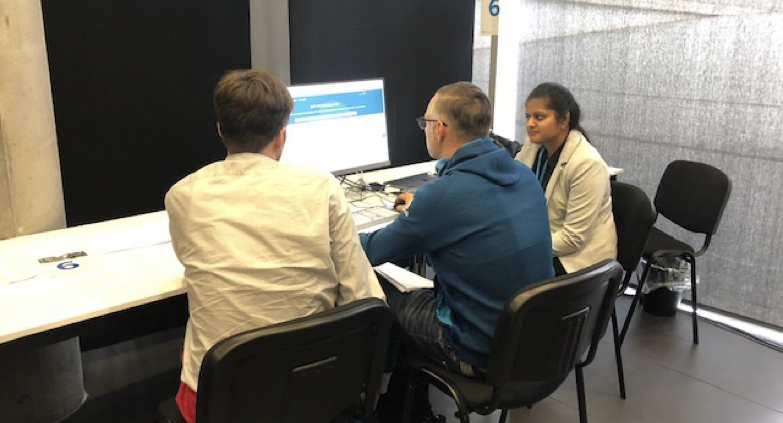
I flew to Barcelona with the PM and spent two days moderating usability sessions with users from 16 companies. I didn't observe from a distance, I sat with them, watched where they hesitated, listened to what they said when they thought no one was judging. By the end, I had a clear picture: the problem wasn't search. It was that the whole structure of the site was organised for SAP, not for the people using it.
Key Deliverables
- ·Usability testing with 16 companies
- ·User mental model mapping
- ·SAP TechED 2019, Barcelona
- ·Pain-point synthesis report
02
Persona Mapping & Architecture
The research revealed that "developer" wasn't one thing, there were API developers, integration developers, consultants, and solution architects, all using the same hub with completely different mental models and success criteria. Designing for all of them with one undifferentiated experience was the original mistake. I rebuilt the IA around who would actually be using it.
Key Deliverables
- ·4 detailed user personas
- ·Target User Analysis
- ·Information architecture redesign
- ·User flow mapping per persona
03
Design Exploration
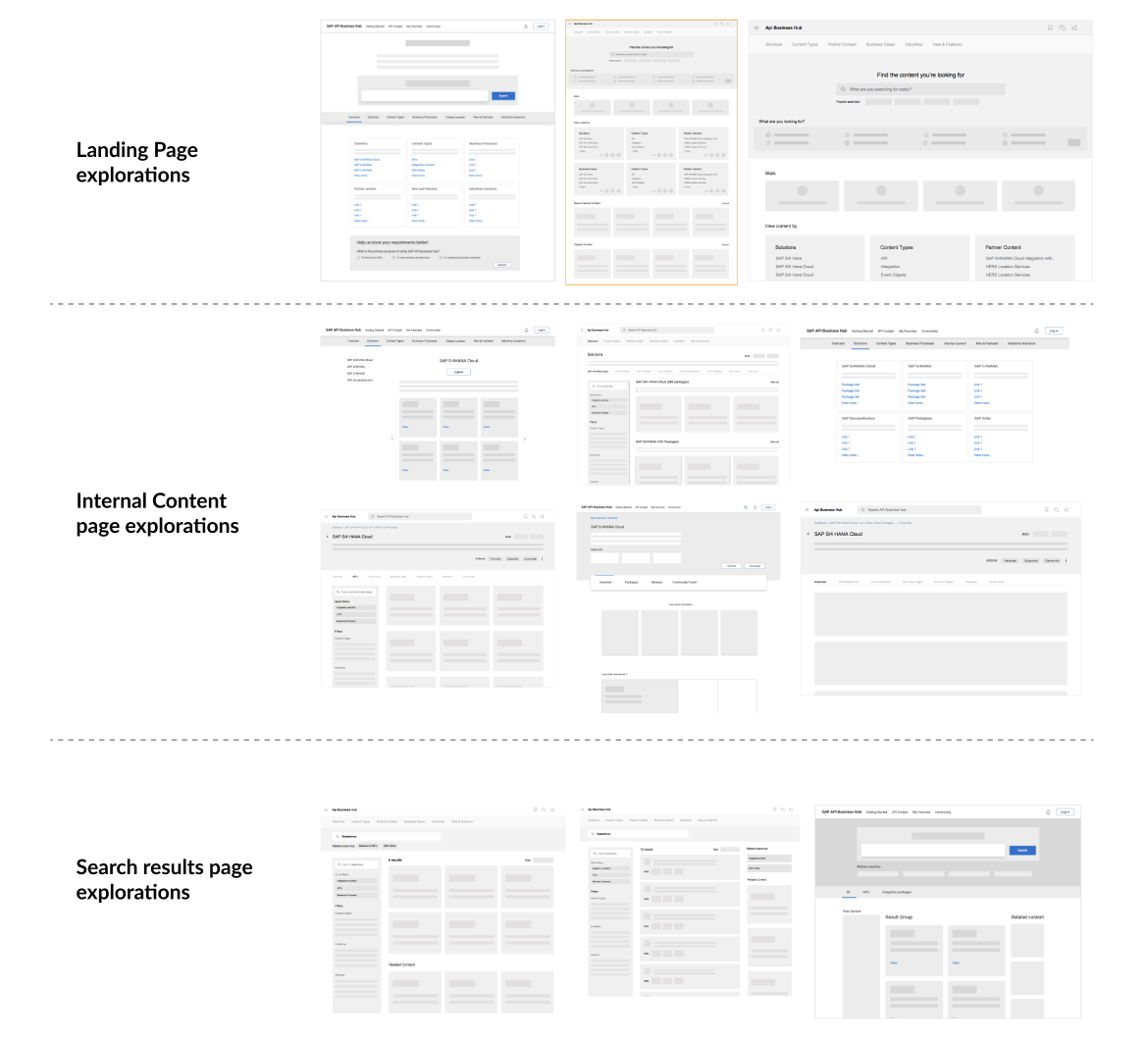
I explored dozens of layout and navigation patterns before landing on a direction. Some ideas looked great but fell apart when you added real content. Others worked for power users but lost first-timers. I worked with an external agency to align on visual direction, translating the IA logic into a design language that felt clean and purposeful within SAP's guidelines.
Key Deliverables
- ·Landing page explorations
- ·Content page layout variants
- ·Search results page explorations
- ·Design system alignment with SAP
04
Prototyping & Validation
Prototyping is where ideas break. I built high-fidelity prototypes for every core journey and tested them with stakeholders before development started, because changing a prototype costs nothing, and changing a shipped product costs everything. I stayed embedded with the dev team through implementation to make sure what launched matched what was designed.
Key Deliverables
- ·High-fidelity sketch prototypes
- ·Stakeholder Testing
- ·Stakeholder validation sessions
- ·Developer handoff documentation
- ·Implementation quality reviews
03, PERSONAS
Four target user personas
Identified and defined four distinct target user personas for the Business Accelerator Hub, each with different goals, technical depth, and content needs.

API Developers
Developers building apps & extensions
Develop apps and extensions by making use of APIs from SAP and selected partner APIs listed in SAP API Business Hub.
Goals
- ·Evaluate APIs quickly
- ·Reduce integration time
- ·Find reliable partner APIs
Pain Points
- ·Fragmented discovery experience
- ·No built-in API testing
- ·Time wasted searching
"I don't want complexity when I want to find content."

Integration Developers
Developers building integration solutions
Develop integration solutions by consuming integration content that is listed in SAP API Business Hub.
Goals
- ·Find integration packages fast
- ·Validate compatibility
- ·Reduce handoff friction
Pain Points
- ·Scattered integration content
- ·No filtering by use case
- ·Hard to assess readiness
"I need to see the integration flow before I commit to a package."

Consultants
Explorers finding content for business cases
Search and explore the digital content which fits their business use case.
Goals
- ·Discover relevant assets
- ·Understand business context
- ·Share findings with clients
Pain Points
- ·Content not mapped to business outcomes
- ·Overwhelming catalogue
- ·Poor search relevance
"I need to find the right content quickly to advise my client."

Solution Architects
Architects defining application strategy
Responsible for the business cases which application development is based on.
Goals
- ·Evaluate APIs at a strategic level
- ·Ensure scalability
- ·Validate before adoption
Pain Points
- ·Manual validation effort
- ·Scattered information
- ·Lack of trust in API readiness
"I need to analyse catalog content easily to recommend to the team."
04, USER JOURNEY MAP
A day in the life of a Senior Integration Developer
Mapping the before and after experience across key workflow stages, showing how Business Accelerator Hub reduced friction and empowered developers.
Before
Kickoff & Requirement Understanding
09:00 AM
Reviews integration requirements from product and backend teams
Thought: Unclear starting point for API discovery
Pain: Dependency on tribal knowledge
Emotion: 😟 Worried
›
Discovery
12–15 minutes
Searches for relevant APIs
Thought: Fragmented search across multiple portals
Pain: Low confidence in results
Emotion: 😟 Worried
›
Exploration
20–30 minutes
Reviews API documentation of different APIs
Thought: Inconsistent and hard-to-scan documentation
Pain: Cognitive load
Emotion: 😣 Stressed
›
Evaluation
30–60 minutes
Tests API feasibility
Thought: Manual testing using external tools
Pain: Context switching
Emotion: 😣 Stressed
›
Adoption & Implementation
24–48 hours
Integrates APIs into the system
Thought: Slow and error-prone implementation
Pain: Unclear authentication
Emotion: 😤 Frustrated
›
Wrap-up & Team Sync
06:00 PM
Shares progress with team
Thought: Uncertainty in progress and delays
Pain: Lack of clarity
Emotion: 😞 Drained
After
Kickoff & Requirement Understanding
09:00 AM
Reviews integration requirements
Thought: Clear starting point with a centralized hub
Opp: Single source of truth
Emotion: 🙂 Confident
›
Discovery
3–5 minutes
Searches for relevant APIs
Thought: Quick and relevant discovery within a unified platform
Opp: Centralized search
Emotion: 🙂 Clear
›
Exploration
10–15 minutes
Reviews API documentation
Thought: Clear and structured documentation
Opp: Clear structure and better views to understand APIs and integration flows
Emotion: 🙂 Reassured
›
Evaluation
10–20 minutes
Tests API feasibility
Thought: Instant testing within the platform
Opp: Integrated sandbox
Emotion: 😊 Productive
›
Adoption & Implementation
2–4 hours
Integrates APIs into the system
Thought: Smooth and guided implementation
Opp: Code snippets
Emotion: 💡 Empowered
›
Wrap-up & Team Sync
5:00 PM
Shares progress with team
Thought: Confident and clear updates
Opp: Validated progress
Emotion: 😊 Satisfied
05, DESIGN EXPERIENCE VALUES
Experience values we used to build
First time users
Holistic and optimistic
This looks like a place where I can find everything I'm looking for
Simple and intuitive
I can easily understand what's going on and navigate to my tasks
Interesting & Engaging
All of this content looks interesting, let's see what is there and what they recommend for me
Trusted and satisfying
I was easily guided to complete my task with minimal effort!
Repeat users
Reliable
I know that I can find the latest content on Business Accelerator Hub
Personal
The system recognises me and my preferences and shows me relevant content accordingly
Familiar
I know how to navigate to complete my tasks quickly without assistance
Engaging
I feel that this is a space to engage with like minded people and I feel valued for my opinions and feedback
06, SOLUTIONS
Six surfaces. Every one rebuilt from the user's perspective.
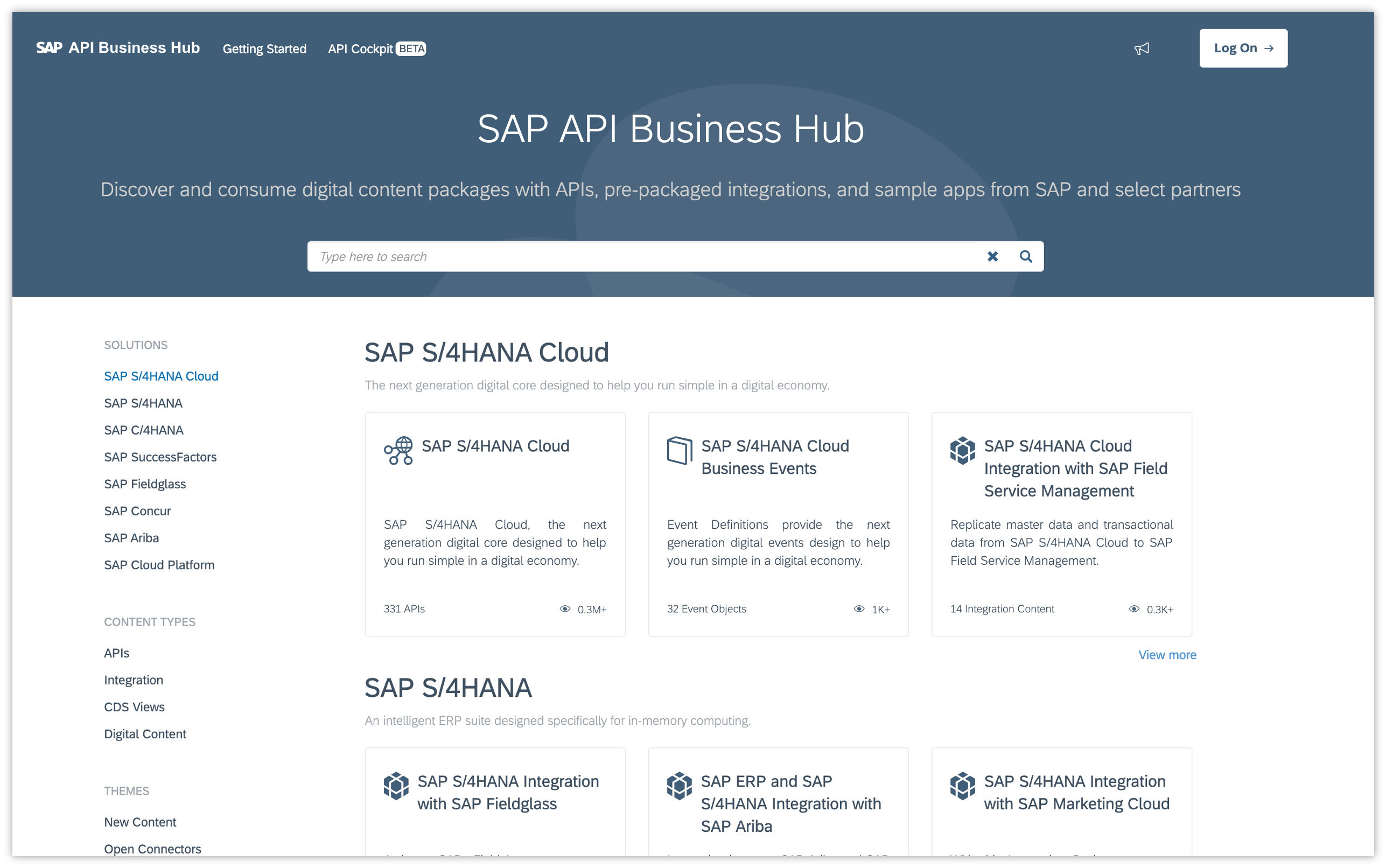
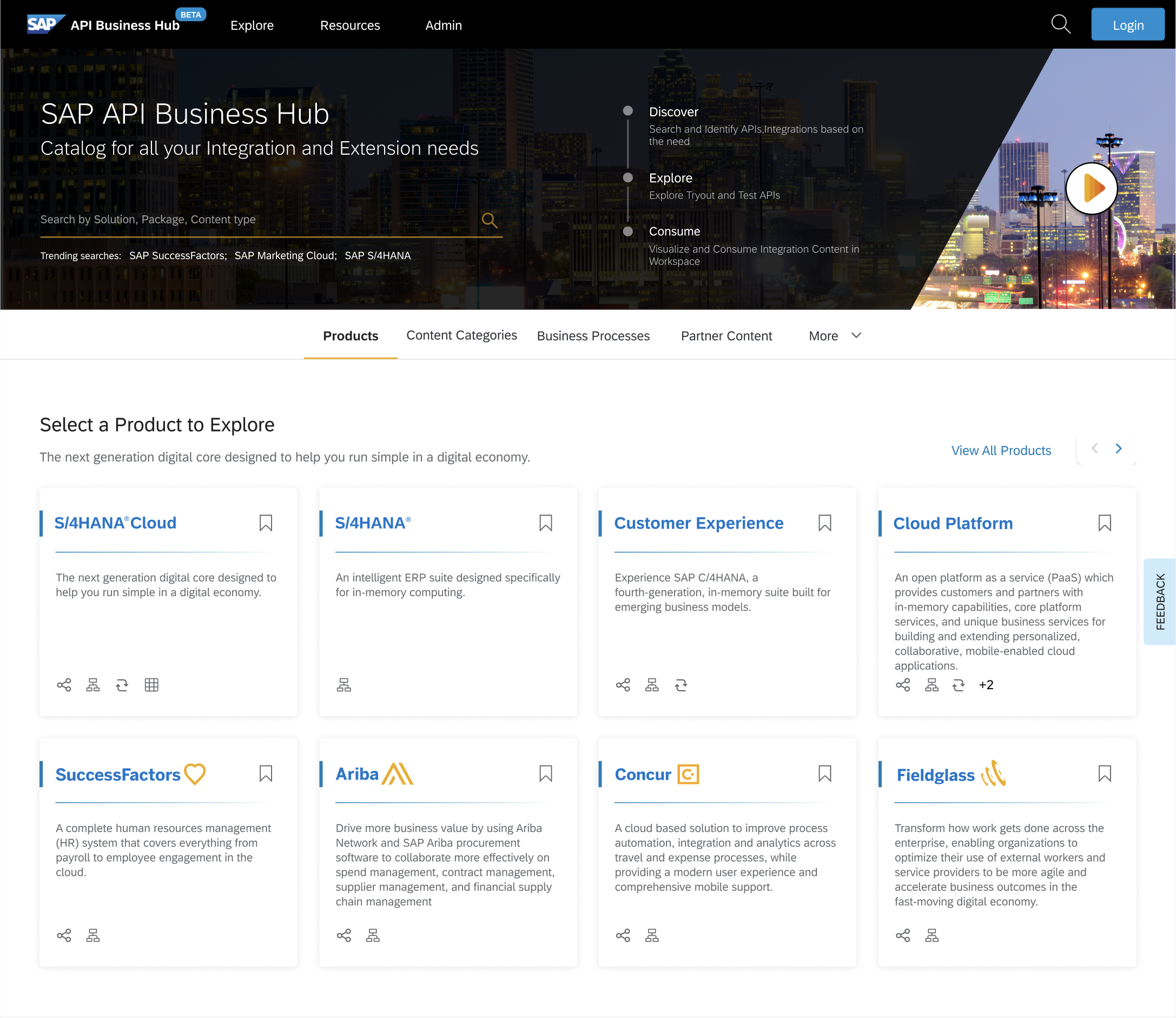
The IA redesign touched every major surface in the Hub. Each before/after below represents a specific failure mode identified in research, and the design decision that fixed it.
Landing Page
Before · SAP API Business Hub (2019)
After · Business Accelerator Hub (Redesign)
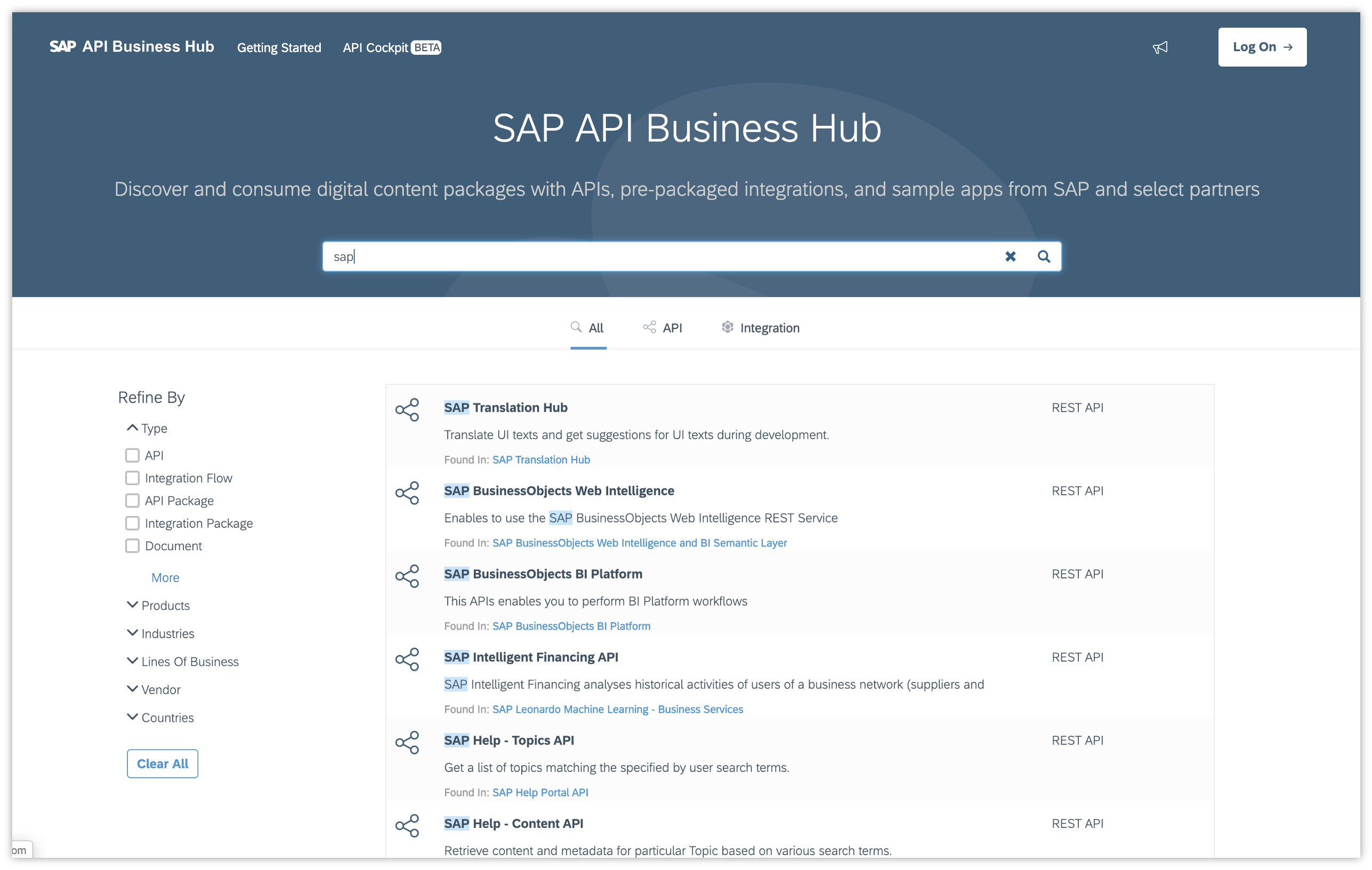
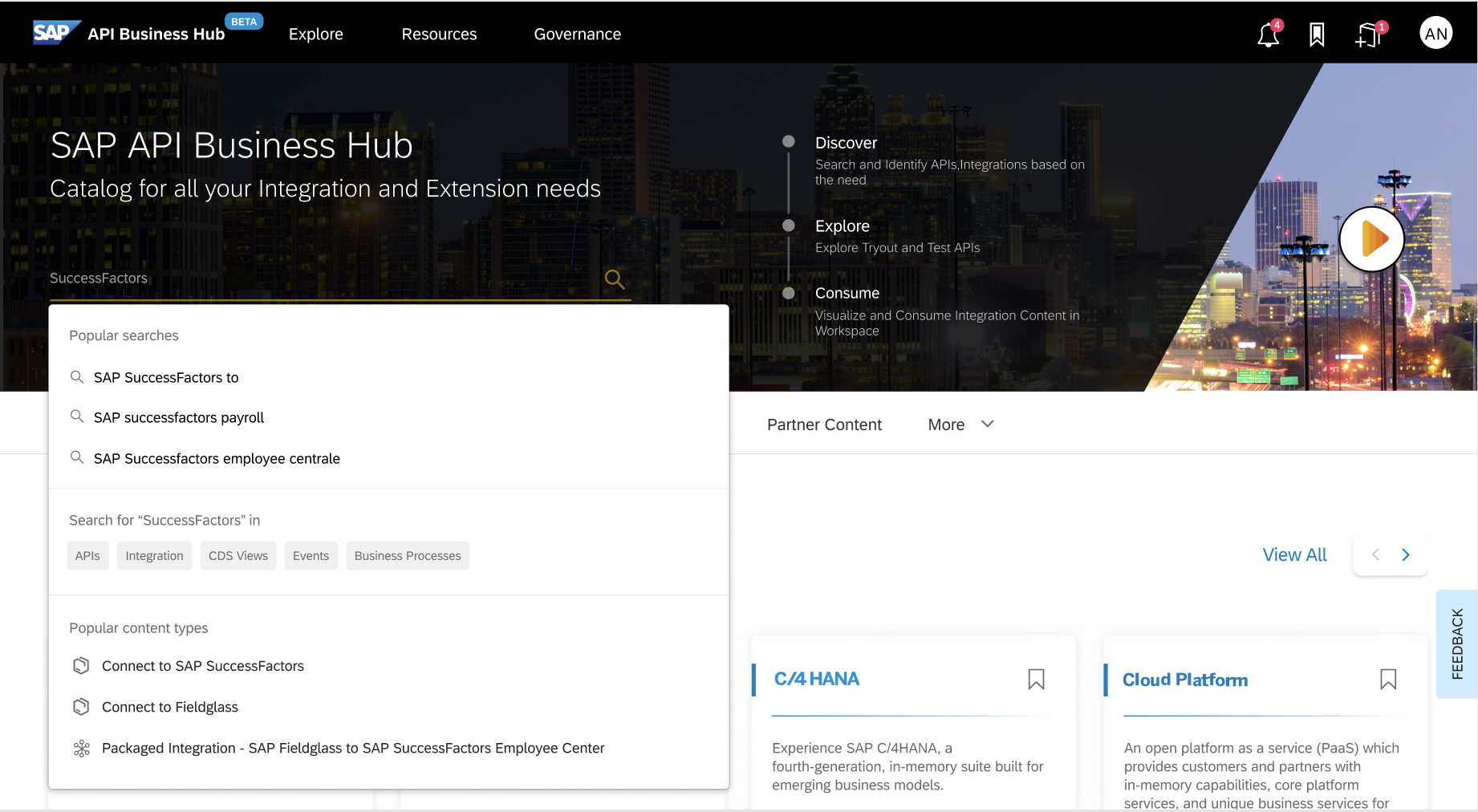
Search experience
Before · SAP API Business Hub (2019)
After · Business Accelerator Hub (Redesign)
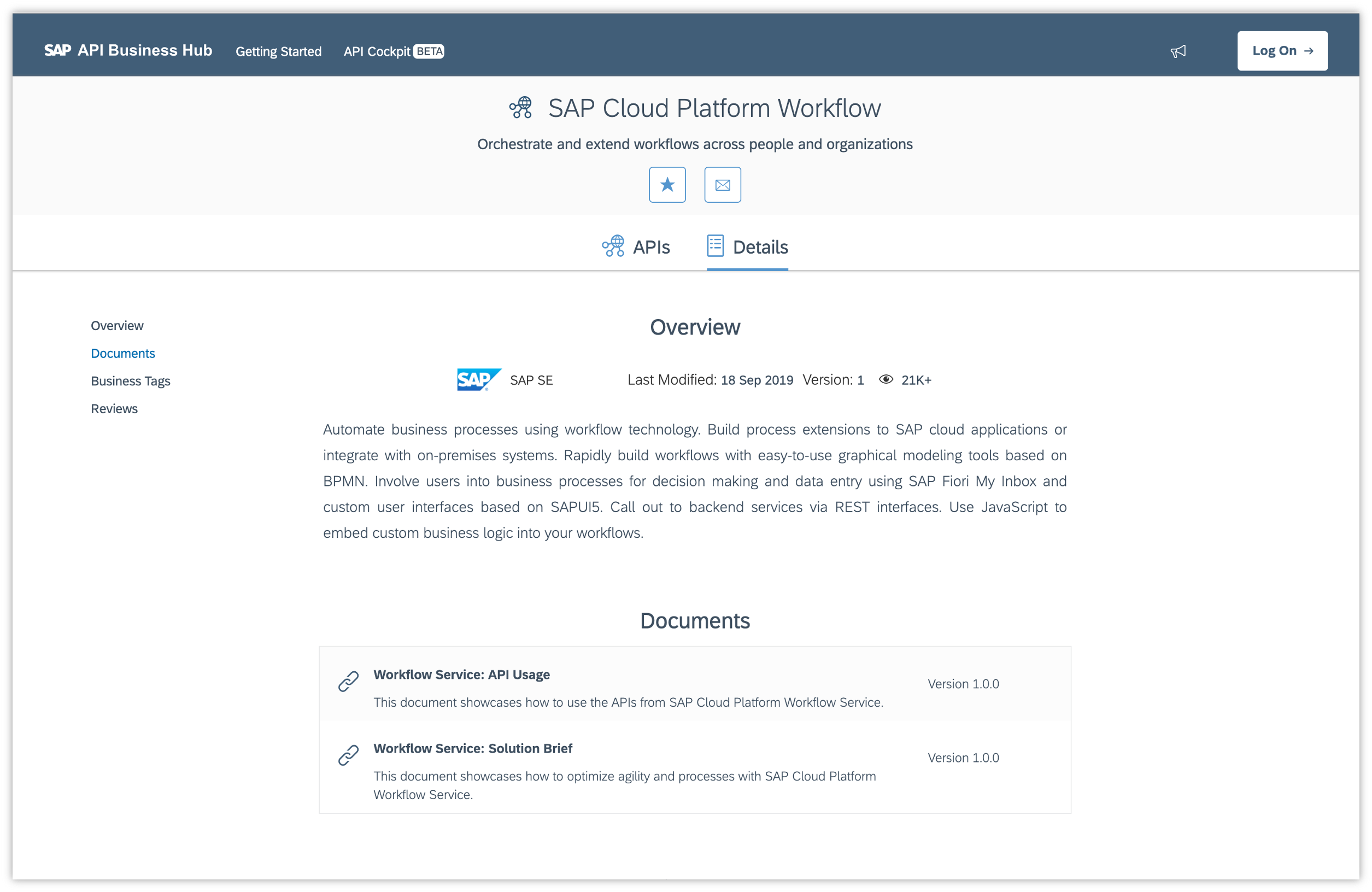
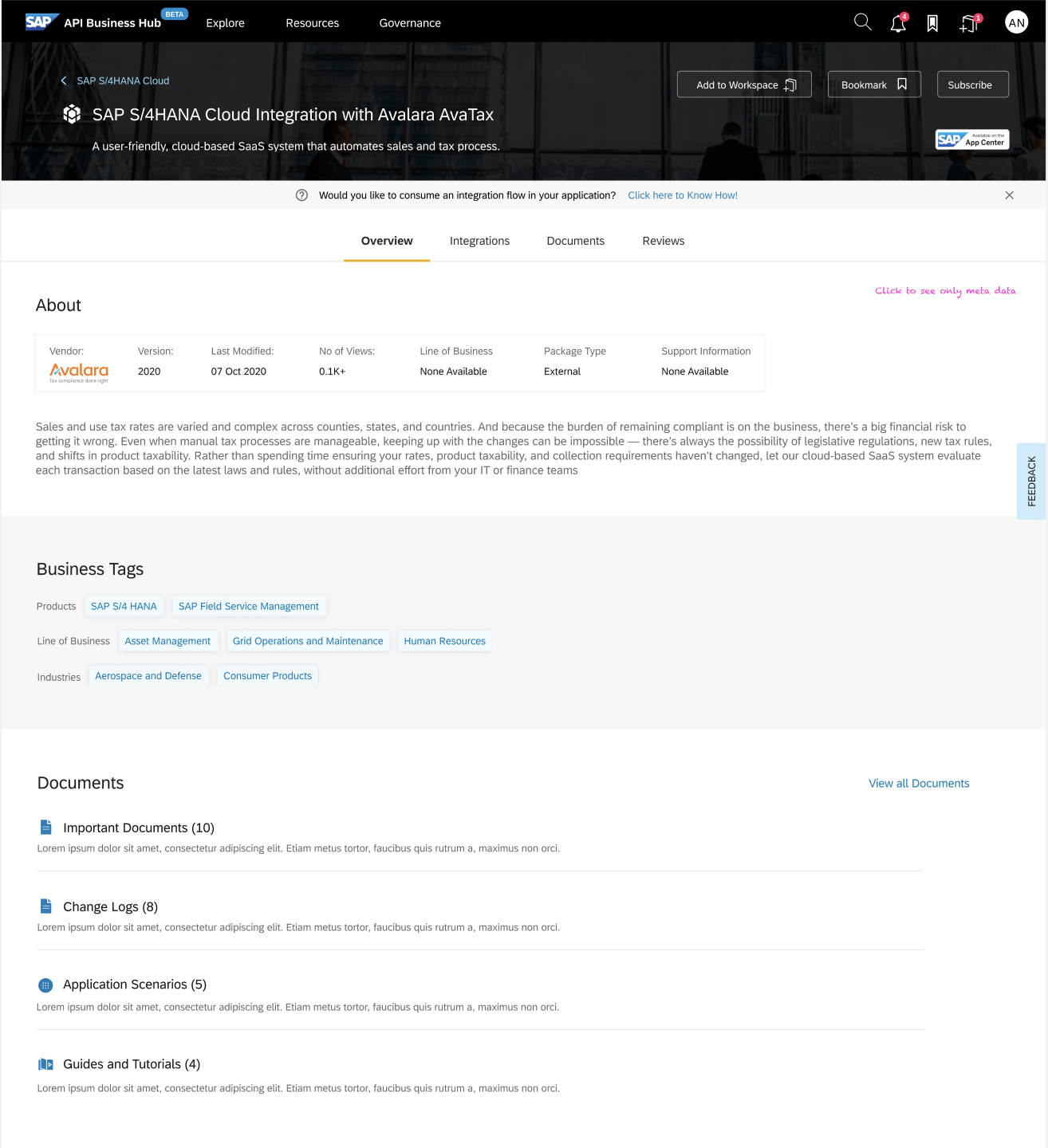
Product details page
Before · SAP API Business Hub (2019)
After · Business Accelerator Hub (Redesign)
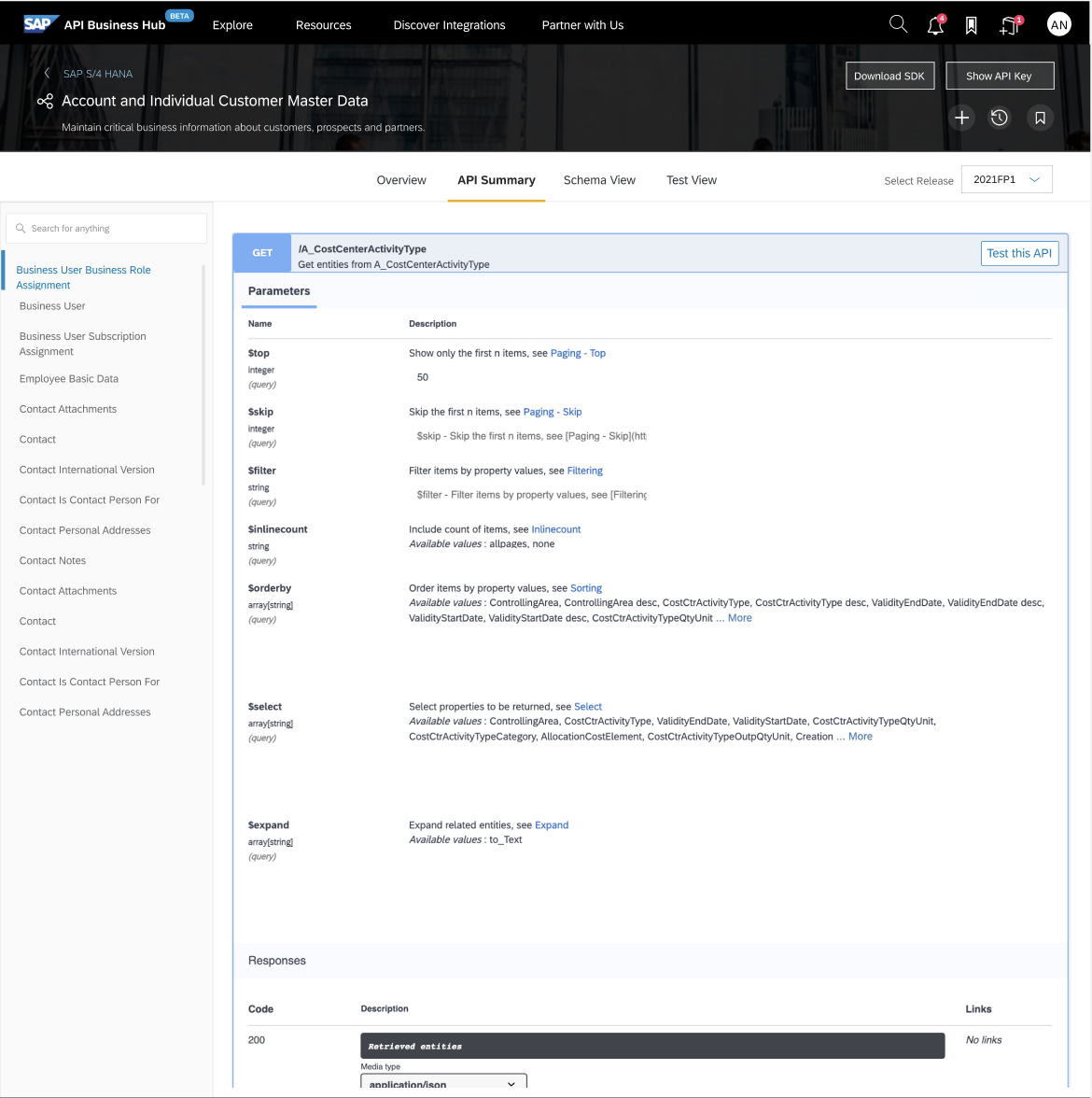
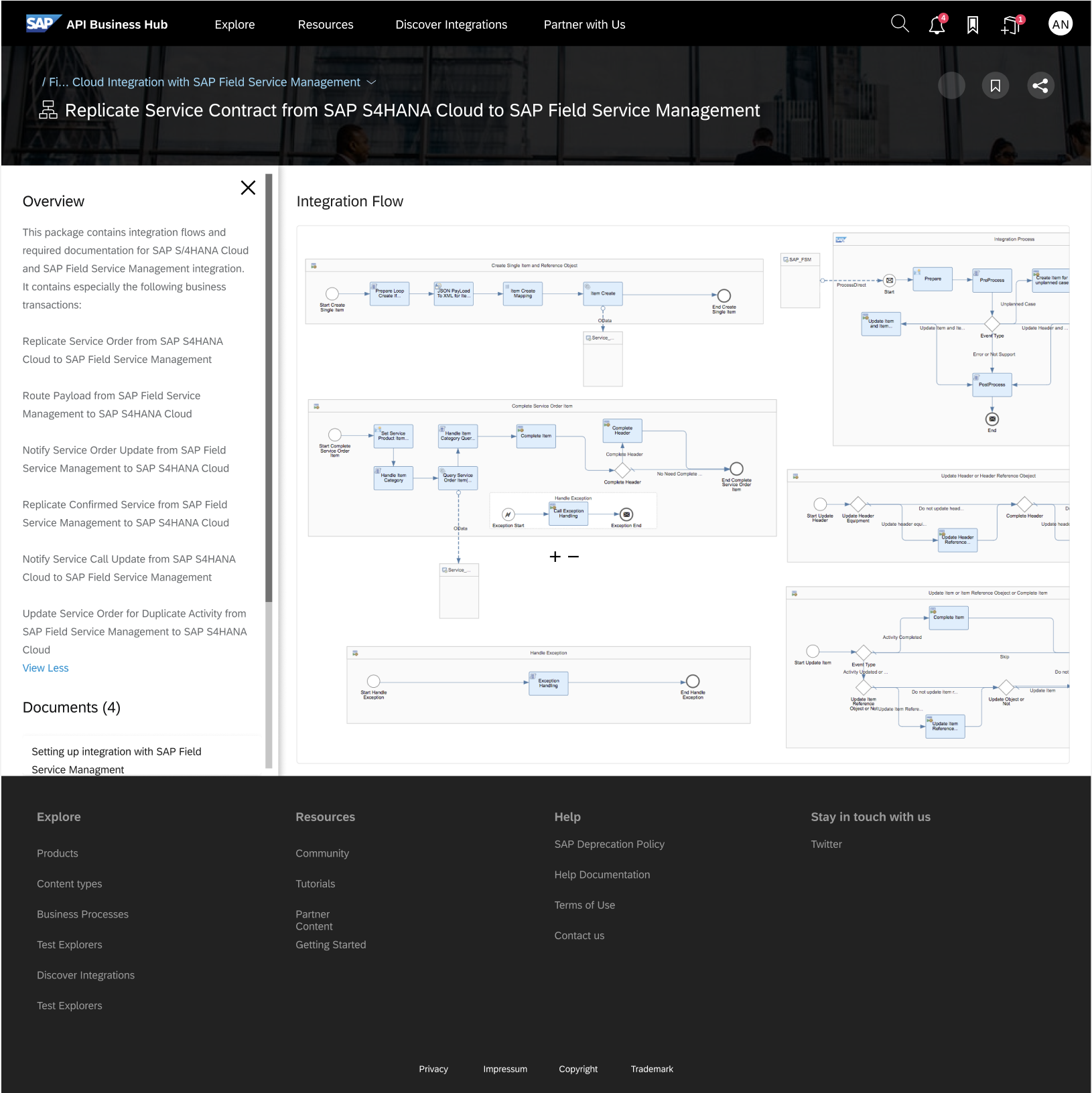
Redesigned content structure
After · API details
After · Integration flows
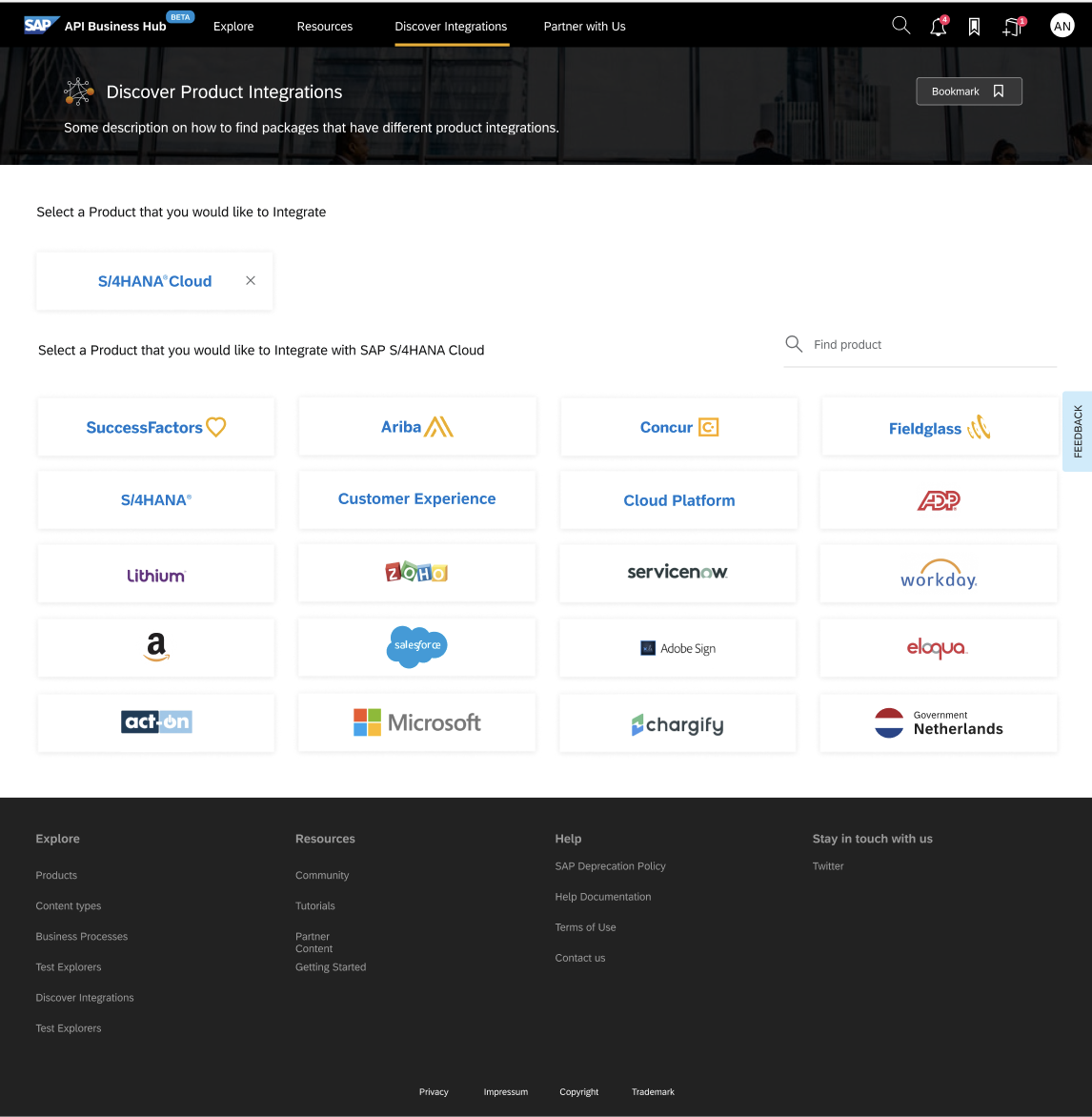
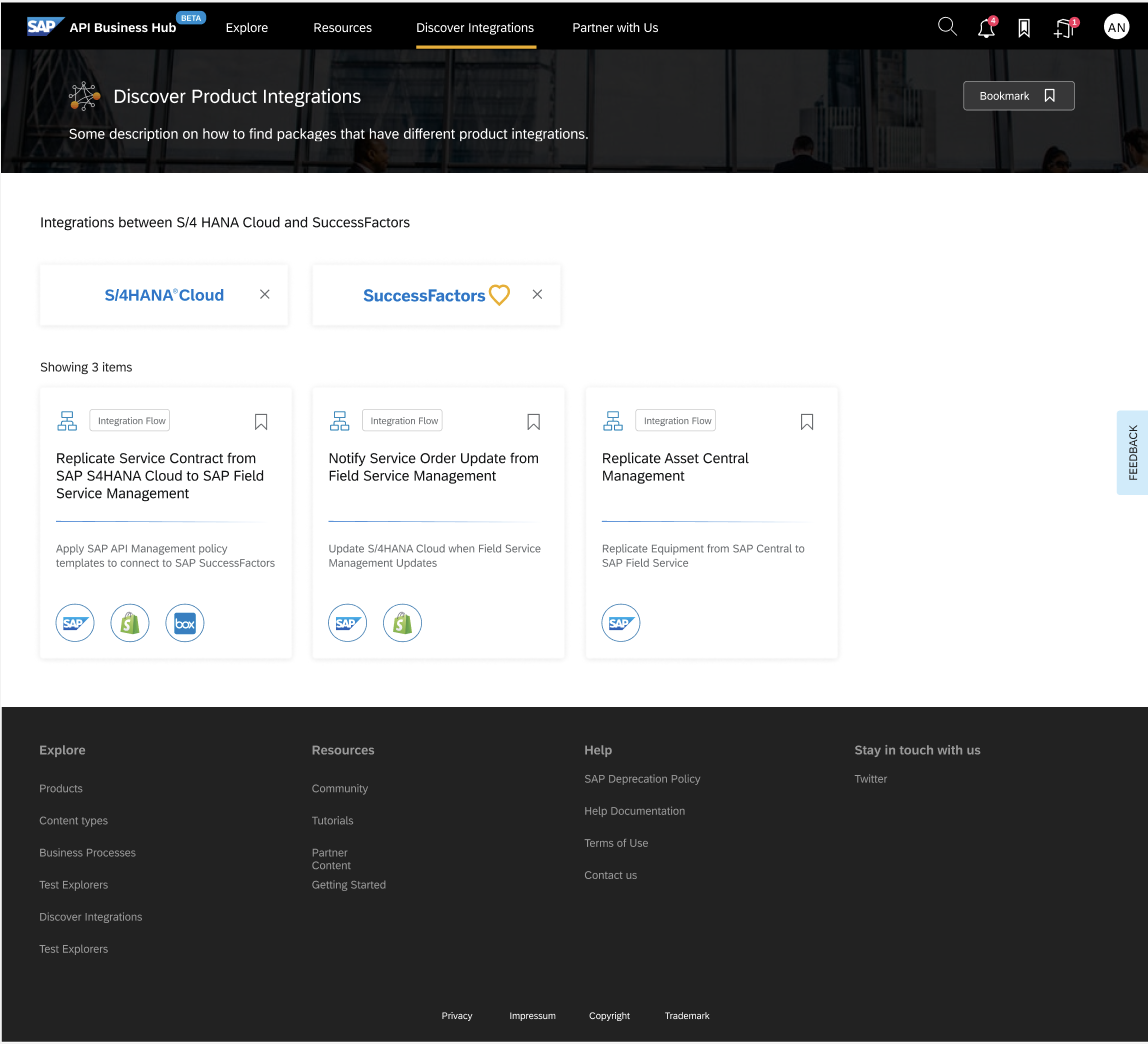
Discovering cross product integrations
After · API details
After · Integration flows
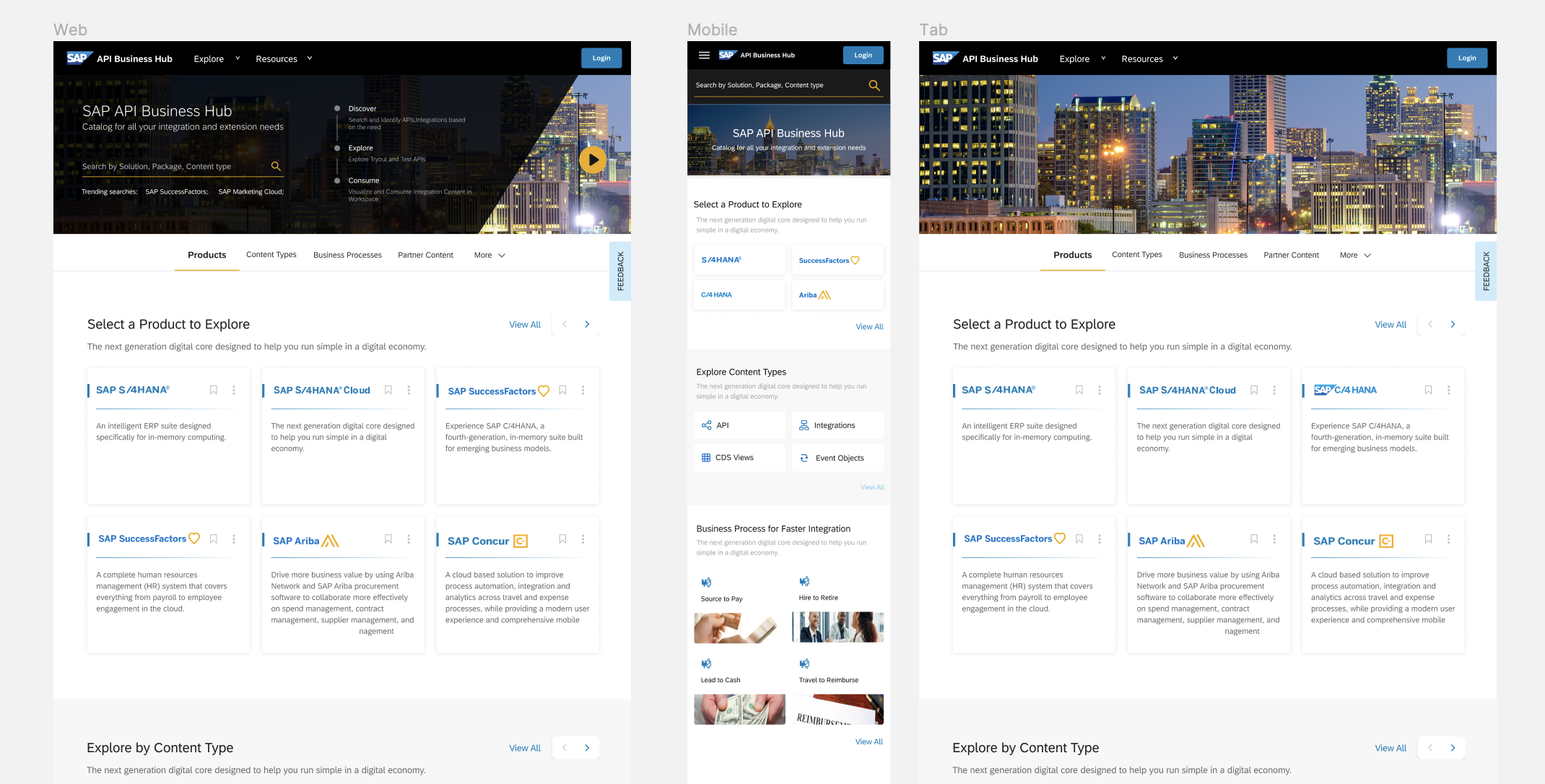
Responsive design
After · Web, Mobile & Tab
07, THE HARD CALL
Leadership wanted a UI refresh. I made the case to rebuild the architecture.
When I joined the Business Accelerator Hub project, the brief was a visual refresh, modernise the interface, clean up the aesthetics. But after the first round of research and usability testing with 16 companies at SAP TechED Barcelona, it became clear that the problem wasn't the UI. It was the information architecture. Developers couldn't find what they needed because the content was structured around SAP's internal taxonomy, not how developers actually search and discover APIs.
I went back to leadership with a case to expand scope, not to pad the project, but because fixing the surface without fixing the structure would mean the same users would hit the same walls in slightly better-looking screens. I built a data-backed argument: session recordings, drop-off patterns, and direct user quotes that showed where the IA was breaking the experience.
Leadership was initially resistant, a structural redesign meant renegotiating timelines and stakeholder expectations. But the research was hard to argue with. We got alignment, restructured the content model, and the expanded scope ultimately produced a more defensible, higher-impact outcome than a refresh would have.
08, RESULTS & IMPACT
What it took to make 80,000 developers stop searching and start building.
The measure of success for a developer portal isn't how it looks. It's how fast someone can go from "I need an API" to "I'm building with it." These outcomes show the distance covered.
16
Companies Tested
End-user testing at SAP TechED 2019 Barcelona across 16 companies, insights that drove every design decision
E2E
Design Ownership
Led end-to-end design, from user research and IA through to final prototypes and developer handoff
↑UX
Discovery Improved
Restructured information architecture and search, dramatically improving time-to-content for all user types
"Neha drove the redesign from first principles, she ran the testing, synthesised the insights, and delivered a portal that actually works for our diverse user base. The new Business Accelerator Hub is a direct result of that rigour."
Product Owner, SAP API Business Hub
Next case study
SAP Event Mesh →